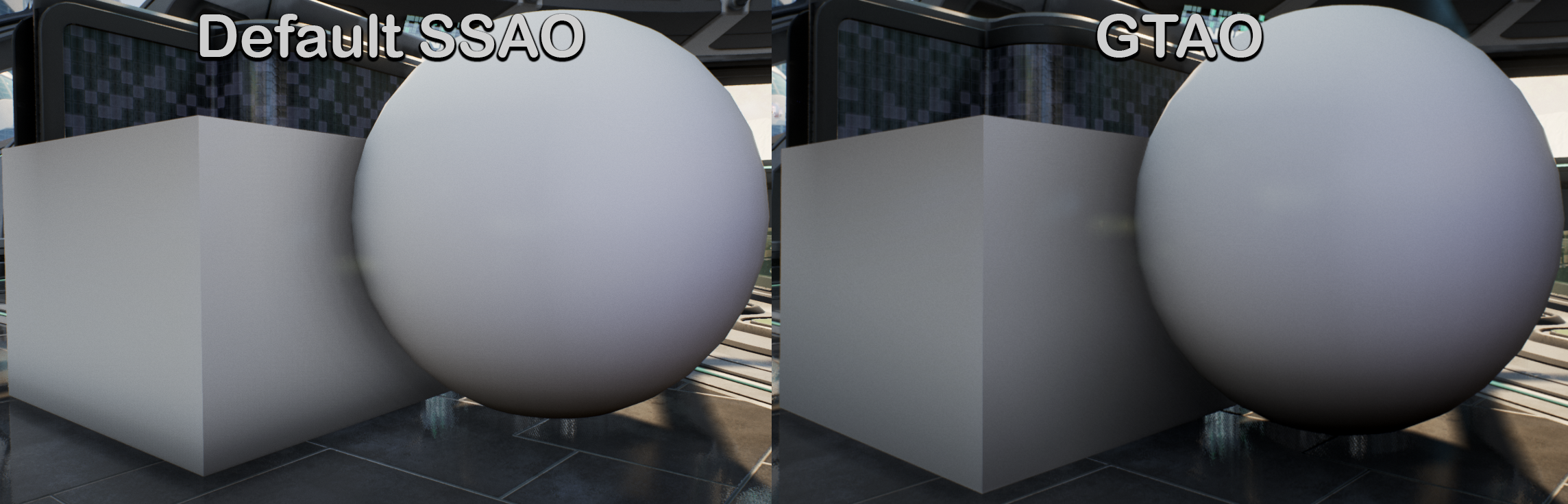
State of GTAO in Unreal
Unreal engine uses its own in-house solution for Screen Space AO, which is, subjectively, not best fit in every case, but what if I told you, there superior gem hidden from us for a while?
I did not found mentions of GTAO unreal engine since 4.24 in Google and Unreal Source discord, but only people struggling to enable it from time to time. I did some little research, so I hope to make some things clear about it:
- Has been in engine since 4.24.
- Could be enabled with r.AmbientOcclusion.Method=1.
- Seems mobile renderer SSAO uses GTAO as default.
- Used as a part of SSGI(Screen Space Global Illumination).
- for some reason partially broken as for 4.26 and 4.27, fixed later in unreal engine 5 (did not test earlier than 5.3). Could be fixed by disabling Spatial Filtering.
r.GTAO.SpatialFilter=0
- Spatial Filtering tends to make a look like of original SSAO and also a bit more expensive, so there is not much to lose.
- Mixing with Volumetric Lightmaps(requires StaticFriction 1.0 inside PP) / Distance Field AO could give promising results.
- Intensity of Ambient Occlusion inside PostProcess appears not work at all and would just toggle AO state.
- Much cheaper then original SSAO with my CVars.(did not properly profile but twice at least)
- you could up quality by increasing r.GTAO.NumAngles and r.GTAO.Downsample=0, but the would become expensive really fast.
- r.GTAO.FalloffEnd is “distance” of AO. Depends on project it could be higher or lower . tend to make GTAO a bit more expensive
Settings which I used for screenshots and currently use in my project:
[/Script/Engine.RendererSettings]
;...

r.AmbientOcclusion.Method=1
r.GTAO.TemporalFilter=1
r.GTAO.SpatialFilter=0
r.GTAO.UseNormals=1
r.GTAO.Combined=0
r.GTAO.ThicknessBlend=0
r.GTAO.FalloffEnd=360
r.GTAO.NumAngles=2
r.GTAO.Downsample=1
Some image